
Apple @ Work is exclusively brought to you by Mosyle, the only Apple Unified Platform. Mosyle is the only solution that integrates in a single professional-grade platform all the solutions necessary to seamlessly and automatically deploy, manage & protect Apple devices at work. Over 45,000 organizations trust Mosyle to make millions of Apple devices work-ready with no effort and at an affordable cost. Request your EXTENDED TRIAL today and understand why Mosyle is everything you need to work with Apple.
The new Apple Business Manager API enables third-party tools to access device data directly from Apple in a secure, predictable, and really helpful manner for IT teams managing large fleets of Apple devices. It is the kind of work that Apple does behind the scenes that ultimately has a huge impact as people build around it. When Apple exposes more of its device information and management capabilities through official APIs, the entire ecosystem benefits, and a new app is a prime example.
About Apple @ Work: Bradley Chambers managed an enterprise IT network from 2009 to 2021. Through his experience deploying and managing firewalls, switches, a mobile device management system, enterprise grade Wi-Fi, 1000s of Macs, and 1000s of iPads, Bradley will highlight ways in which Apple IT managers deploy Apple devices, build networks to support them, train users, stories from the trenches of IT management, and ways Apple could improve its products for IT departments.

Anyone who has ever tried to manage AppleCare renewals at scale knows that Apple Business Manager technically contains warranty data, but it is buried and not presented in a way that helps you make decisions about new purchases, repairs, etc. ABM Warranty takes that same data and turns it into something that Apple should have built years ago. It is fast, native, and built entirely on top of the official Apple Business Manager API.
What is ABM Warranty?
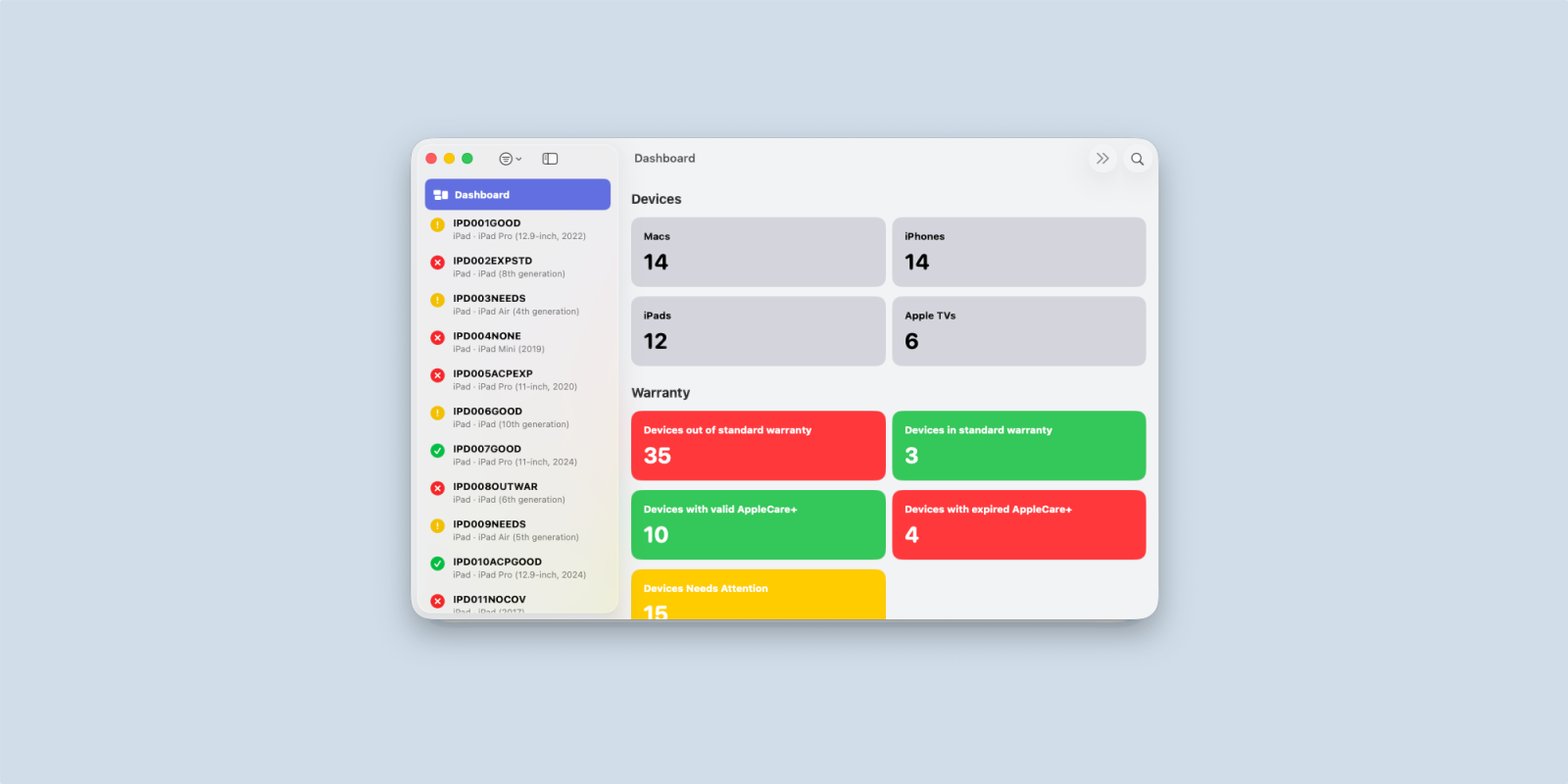
ABM Warranty gives IT teams a nice and clean way to show Apple device warranty information across every device. It uses color coding to highlight which devices are in warranty, out of warranty, expiring soon, need attention, or have AppleCare Plus events in their history. You can filter by platform, export out to a CSV, or drill into a single device to see all its historical coverage information. If you have ever wondered which devices have expiring AppleCare, ABM Warranty provides the answer easily, and it’s always accurate.
The key point here is that none of this would be possible without Apple’s new API for Apple Business Manager. Apple is exposing more data in a structured and predictable manner, and developers are finally able to build tools that IT teams have long desired. ABM Warranty uses the same authentication flow that Apple documents in its Business APIs. You generate an API key in Apple Business Manager, download the PEM certificate, and the app handles secure authentication locally.
The app itself is designed like something Apple should have built and probably bundled inside Apple Configurator. The dashboard displays your Mac, iPhone, iPad, and Apple TV fleet, featuring instant filtering and a detailed tile view that surfaces every AppleCare record associated with that serial number. It even detects overlapping AppleCare Plus events and renewal windows.
There is also a smart detail view that is ideal for IT teams who live in spreadsheets or upload the data to another IT management tool. You can copy any field, select any value, and export any filtered view directly to CSV. For large environments with a mix of standard warranty, AppleCare Plus, and renewal-eligible devices, this instantly becomes a great tool for IT departments.
The upcoming roadmap for the app makes it even more interesting. The developer behind the app has stated that future versions will support keychain-based certificate selection, preferences for automatically deploying credentials, Apple School Manager integration, enhanced filters, and more advanced visualizations for devices with longer AppleCare histories. All of this is possible because the ABM API gives developers the data to work with in a way that is stable and predictable, vs. trying to clean it up
The bigger story is that Apple’s API work is finally paying off for customers. For years, IT teams have requested more visibility into warranty status, repair events, hardware coverage, and lifecycle information from Apple. Apple is now enabling this through official channels, rather than relying on screen scraping or tools that reverse-engineer undocumented API endpoints. ABM Warranty shows what is possible when Apple opens the door for the ecosystem, and I think this is a great sign. I believe this kind of information will be quickly integrated into other IT tools as well.

Wrap up
If you manage Apple devices at scale at work, tools like this will become an essential part of your workflow. Apple has built the foundation with API access, and IT teams are finally getting the visibility they have needed for years. You can download ABM Warranty on the Mac App Store and start pulling your organization’s warranty data within minutes once you set up all the API keys.
Apple @ Work is exclusively brought to you by Mosyle, the only Apple Unified Platform. Mosyle is the only solution that integrates in a single professional-grade platform all the solutions necessary to seamlessly and automatically deploy, manage & protect Apple devices at work. Over 45,000 organizations trust Mosyle to make millions of Apple devices work-ready with no effort and at an affordable cost. Request your EXTENDED TRIAL today and understand why Mosyle is everything you need to work with Apple.


FTC: We use income earning auto affiliate links. More.



Comments